It was among the most welcome phone calls I’ve ever made.
The call was to Frontier or Verizon or whatever it is they currently call themselves. I was calling to tell them that after 21 years, one month, and five days I was done with what in my estimation is the worst phone company ever.
The night before, I had disconnected everything of theirs in my house, making sure to reset the modem-router before finally unplugging it, so when I ship it back it won’t carry any of my information.
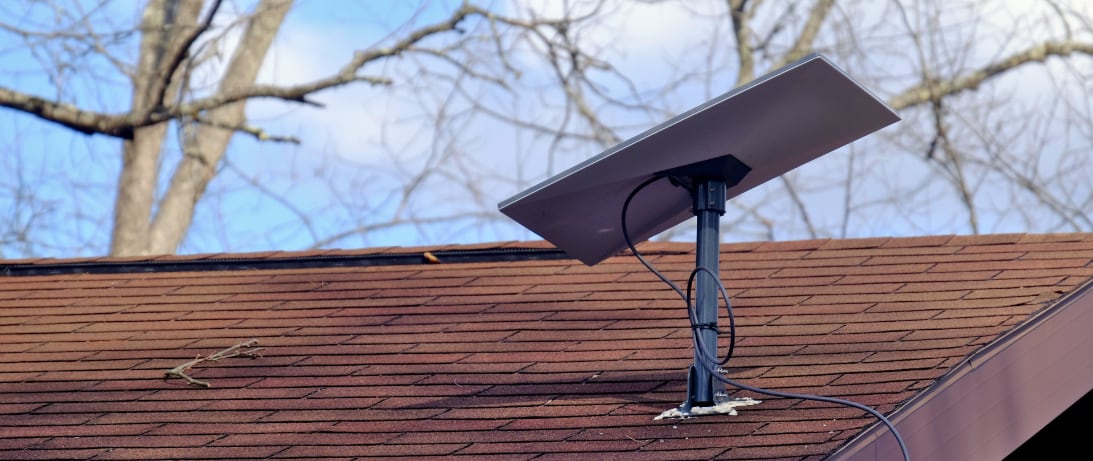
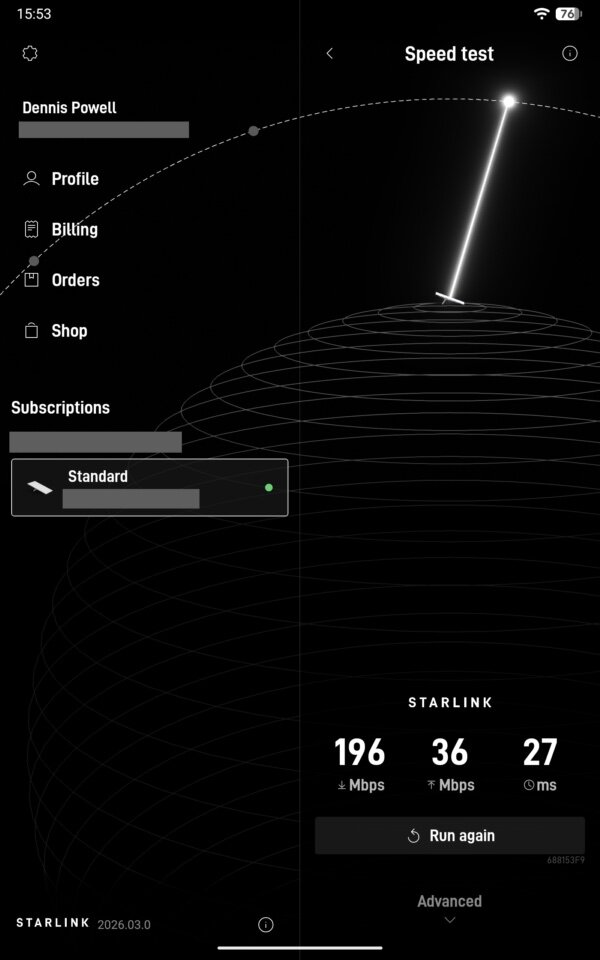
We had endured a ridiculous amount of rain here. The weather radio was doing its usual thing of going off every hour or so with flood warnings. If my new, improved system had shortcomings, they would have become apparent. The Starlink dish, sitting in the grass because the weather had made climbing on the roof to mount it inadvisable, worked like a champ during it all. As an experiment I ran an internet speed test during the worst of it, and was still getting close to the 200-megabits-per-second speed for which I pay. That’s close to 10 times as fast as the phone company had delivered, and the phone company came at a higher price.
Okay, fine, the internet. But I had just gotten rid of the phone company. What was there to be done for telephone service?
Doing some research I found alternatives that have nothing to do with the telephone company.
For several years I’ve used an application called MySudo. It allows one to have multiple phone numbers anonymously at a relatively low price. I selected the version that for less than $50 per year gives me three phone numbers, ostensibly located anywhere I want in the U.S. or any of a couple of other countries. I chose three in places that would be local to places people I’m likely to talk with live, including one in St. John’s, Newfoundland. (The company includes an email address and SMS service for each number. I rarely use any of that.)
I discovered that calls to those numbers do not ring on my devices, which renders MySudo useless to me in many ways. The reason I keep it around is that it lets me call people over the internet from my tablet computer, which makes doing interviews easy, and though the phone numbers don’t ring when the calls are incoming, they do take messages so I can call back. But it’s not much of a phone replacement in my estimation. (It could be that it works more fully on devices not running the GrapheneOS that I use on my tablet and cellular phone.)
Until the arrival of Starlink, what I used for telephone calls didn’t matter because the only source of internet service was the phone company, and internet came with telephone service (and was subject to the same unreliability). What’s more, there is no cellular service where I live. It was not ideal, but as James Burnham put it many years ago, where there is no choice there is no problem.
I have always carried a cheap cellular phone plan, for use when I am not home and when I needed to climb the hill — where there is a cellular signal — and report it when the phone, internet, and electricity were out. I get it for $15 per month from Mint Mobile. It includes unlimited talk and texting and 5 gigabytes of data per month. I’ve never come close to 5-gb in a month on the cellular phone. I doubt I do 5 gigs on the cellphone in a year.
What’s more, the least expensive Mint service works just fine over wifi, and I don’t think there’s any usage limit to that. Not that it really matters, because when I have wifi I have devices better attuned to email and browsing use. What’s critical is that with my Starlink wifi, I have cellular telephony all the time. At no extra charge. And the quality is excellent. (And Starlink doesn’t use much power, so it makes sense to have it plugged into a good UPS I have, meaning that on the occasions when power goes out, I can report it from the couch and investigate what the problem is.)
I thought that I might be able to bring over the home number that I have had here for the last 21 years. Mint Mobile and my existing phone company agreed. The only problem, I learned from hours dealing with Mint, was that for some unknown reason I couldn’t. This is an inconvenience, though when I considered the landline phone calls I have received in the last month I couldn’t point to a single one that wasn’t a shady sales call or a political call: same thing, different product. Better that they don’t have my number!
But we do love our home phones, don’t we. I investigated, ordered, and for an hour before I returned it owned a device from the Ooma company. This gadget plugs into your router (they make a wireless one, too, but I ordered the wired one) and then you plug your normal phone into it also. This produces what behaves like a normal landline.
The advantages were tempting. I would have free home phone service, with a phone number and everything. Just like the telco, only no telco.
But it took only a few minutes to realize why it wasn’t for me. First, Ooma charges all sorts of monthly regulatory fees, similar to the ones added each month to your phone bill, so it’s not free. Second, if I wanted to keep my existing number I have to pay Ooma $40 (once) to get it, and provide all sorts of paperwork. Also, I would have to continue to pay the phone company until Ooma got around to making the switch, which the company said would take weeks, so I’d have to keep paying the phone company for at least another month. (Other companies, or at least Mint Mobile, make the switch — when they can — within a few days and charge nothing.) Was my existing number worth more than $100 to me? No.
But what settled it for me was when I read Ooma’s privacy policy. No, thanks. Not now and not ever.
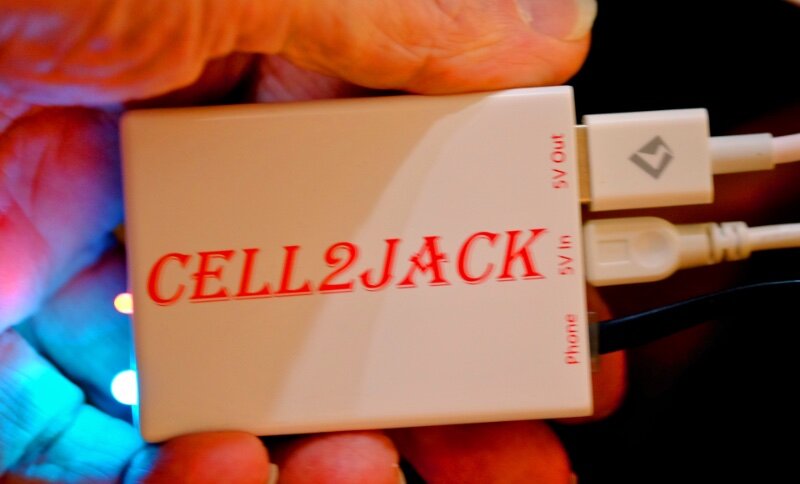
I had just about resigned myself to carrying the cellular phone with me all the time at home, inconvenient but not fatally so, when Tim Butler drew my attention to a dinky but brilliant $40 gadget: the Cell2jack.
This thing seems too good to be true but best I can tell it is true, indeed. About twice the size of a matchbox, this white box has a garish label on the top, two LEDs on one end, and three sockets on the other. One socket is a plain old telephone jack. One is the place for the USB cord that powers it. (An irritation is that you must use the very short included USB cord for power.) The third, the use of which is optional, is a USB socket whence you can recharge your cellular telephone.
It uses Bluetooth to carry your phone’s signal to a regular phone. You plug it together, pair the gadget with your cellular phone, and you’re done.
For the last 20 years I’ve used on for my home a Panasonic wireless four-handset system. It has a base station and three wireless extensions. I attached the Cell2jack to the base station. The whole process, beyond untangling the rat’s nest of cords under my desk before I started, took less than 5 minutes.
So now, to receive a phone call at home, I can simply answer my cell phone, whose signal I receive over the Starlink dish, or I can answer any of the four phones I’ve been using for decades, the signal having have gone from the originator to the internet, to Starlink, down via wifi from Starlink to my cell phone, over Bluetooth to the Cell2Jack to my landline base station, and over its wireless signal to the cordless handsets. Such a Rube Goldberg contraption can’t possibly work, or at least can’t work well, right?
That’s what I thought, too. To test it I added a further complication: I called the cellular phone, over wifi, from the tablet, using one of the MySudo numbers, and left a message. The base station’s answering machine worked perfectly, and the voice clarity was at least as good as what I had gotten from the phone company. I was and am amazed.
The Cell2jack is said by the company to work with very nearly any phone — pushbutton, even rotary dial — that doesn’t require you to crank the generator and ask Mabel to put the call through. You can apparently use it to make your wired phone do anything your cellular phone can do, including summoning the talking spies built into many phones. I don’t use those so I don’t care, but that’s what they claim. (There are a lot of other possibilities as well, and adjustments, but so far I haven’t explored them.)
Also, the external phones, though they are making and receiving calls over the cellular phone, have dialtones. There’s no way I have found of distinguishing use of the traditional phones from when they were hardwired, attached to the telephone company’s line. Well, except they’re now more reliable.
The one oddity is that when I leave the house with my cellular phone, my home has no phone service, the idea of which takes some getting used to.
The Cell2jack company has no privacy policy that I can find beyond that of its web page, which I didn’t need to visit in order to get or use the product.
Having gotten all this hooked up (in fact, the whole project is complete now that I got my neighbor Roger, handyman and carpenter par excellence, to mount the Starlink dish on the porch roof), I used one of the cordless phones to call Frontier/Verizon to cancel my purchase of intermittent services from them. Wouldn’t you know it? For the first time in 20 years I was quickly put through to a pleasant woman speaking in unaccented English who didn’t try to talk me into buying anything I didn’t want.
It was too little, too late.
It was ironic. But somehow appropriate anyway. 

Dennis E. Powell is crackpot-at-large at Open for Business. Powell was a reporter in New York and elsewhere before moving to Ohio, where he has (mostly) recovered.
Pass along this article.
Never Miss Another Article from Dennis E. Powell.
You need to be logged in if you wish to comment on this article. Sign in or sign up here.


Start the Conversation